Web Reconnaissance: Gobuster, SecLists, and Google Dorking
Reconnaissance is where every engagement starts and where most defenders have the least visibility. Knowing which tools to chain, and in what order, separates a noisy scan from a clear picture of the target.
Disclaimer: Everything in this post is for educational purposes only. All techniques described here are practiced in legal, controlled environments such as TryHackMe, HackTheBox, or other authorized CTF platforms. Never use these tools or techniques against systems, networks, or domains you do not have explicit written permission to test. Unauthorized scanning is illegal in most jurisdictions.
Subdomain Recon: Where Reconnaissance Starts
In a previous post, I covered knockpy and crt.sh as the starting point for mapping an attack surface. Knockpy brute-forces subdomain names using a wordlist, while crt.sh mines certificate transparency logs for any subdomain ever issued a TLS certificate. Together they surface forgotten staging hosts, dev environments, and internal services that were never meant to be public.
That post is worth reading first if you are new to this series. This one picks up from there and goes deeper into the next layer of reconnaissance: active enumeration of web directories and DNS records with gobuster, the wordlists that make it effective, and passive recon with Google Dorking when you want to reduce your footprint or gather intelligence before sending a single packet.
Gobuster: DNS and Directory Enumeration
Gobuster is a brute-force tool written in Go. It is fast, configurable, and included in most pentest distributions. The two modes that matter most at the recon stage are dns and dir.
DNS mode enumerates subdomains. You give it a domain and a wordlist, and it queries DNS for each candidate name, reporting back any that resolve. Where knockpy has broader DNS checks built in, gobuster in dns mode gives you full control: choose any wordlist, filter by result type, and pipe output directly into downstream tools.
gobuster dns -d target.com -w /usr/share/seclists/Discovery/DNS/subdomains-top1million-5000.txt
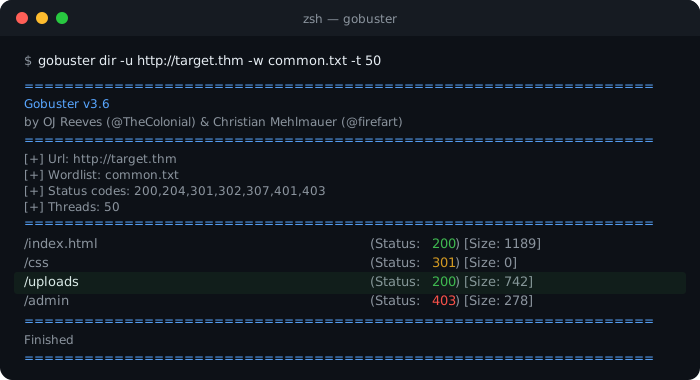
Dir mode enumerates web paths. Give it a base URL and a wordlist, and gobuster sends an HTTP request for each candidate path, reporting anything that does not return a 404. This is how you find admin panels, backup files, configuration endpoints, and upload directories that were never linked from the front end.
gobuster dir -u http://target.com -w /usr/share/seclists/Discovery/Web-Content/common.txt
Both modes share the same flags for thread count (-t), output file (-o), and status code filtering (-b to exclude codes you want to suppress). Be careful with thread count in CTF environments since some boxes rate-limit or crash under sustained load.
I used gobuster’s dir mode in two TryHackMe rooms. In Mother’s Secret, scanning the web root revealed a hidden path that was the entry point for the whole room. In RootMe, directory enumeration surfaced an upload endpoint that accepted PHP files, which led directly to a reverse shell. Nothing on the visible front end pointed to either path. Gobuster found both in seconds.
Wordlists: The Engine Behind Every Scan
A brute-force tool is only as good as the wordlist you give it. Gobuster cannot find a path that is not in the list. This is why SecLists exists.
SecLists is a curated repository of wordlists for every phase of a pentest: usernames, passwords, DNS names, web paths, fuzzing payloads, API endpoints, and more. It is maintained by Daniel Miessler and is one of the most referenced repos in the field. On Kali Linux it installs to /usr/share/seclists/. On other systems, clone it directly.
git clone https://github.com/danielmiessler/SecLists.git
For directory enumeration, Discovery/Web-Content/common.txt is a fast starting list. Discovery/Web-Content/directory-list-2.3-medium.txt has over 220,000 entries and catches most hidden paths in CTF environments. For DNS enumeration, Discovery/DNS/subdomains-top1million-5000.txt is a reliable first pass before moving to the larger million-entry list.
The quality of your recon is largely a function of which wordlists you reach for. Spend time browsing the SecLists directory structure before you start scanning. The categories make clear what each list is built for, and choosing the right one saves you from running a 10-minute scan with the wrong input.
Google Dorking: Passive Recon Without Touching the Target
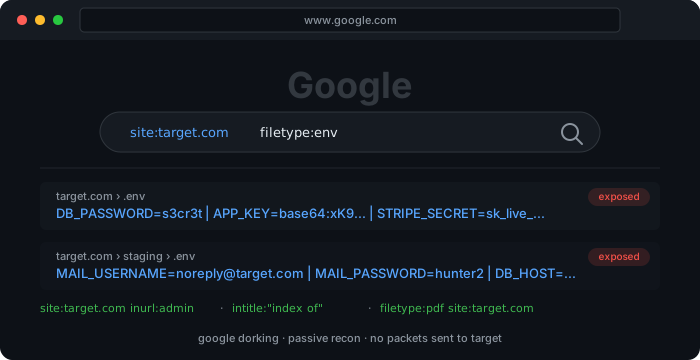
Not all recon requires sending packets to the target. Google Dorking uses advanced search operators to surface information that is already indexed: exposed configuration files, login panels, error pages, open directory listings, and documents that were never meant to be public.
A few operators worth knowing:
-
site:target.com filetype:pdfsurfaces all indexed PDFs on a domain -
site:target.com inurl:adminfinds URLs with “admin” in the path -
intitle:"index of"finds open directory listings -
filetype:env site:target.comsurfaces exposed.envfiles that may contain credentials or API keys
The Google Hacking Database (GHDB) at Exploit-DB maintains thousands of tested dork queries, organized by category: files containing passwords, sensitive directories, vulnerable servers, and more. It is the fastest way to go from zero to a working dork for a specific type of exposure.
Dorking belongs early in any recon workflow because it is entirely passive. It generates no traffic to the target and leaves no trace in server logs. That matters in engagements where stealth is a requirement. It is also good discipline in CTF practice, because it trains you to think about what an organization has already leaked before you start active scanning.
Recon is not a single tool. It is a sequence: passive first (certificate transparency, Google Dorking), then active DNS enumeration, then directory brute-force with a wordlist that matches the target. The tools are free and well-documented. The gap is always in knowing what to ask for and having the wordlists ready before you start.
Enjoy Reading This Article?
Here are some more articles you might like to read next: