How to Publish an Android App on Google Play: Step-by-Step
Publishing Road Rage Runner: Highway Moto to Google Play required navigating every part of the Play Console, from locking in a package name before writing the first line of code to watching crash rates on launch day. Here is the full process.
Choosing Your Package Name Before You Build
The package name is your app’s permanent identity on Google Play. Once published, it cannot be changed. If you rename it, Google treats it as an entirely new app, and your ratings, reviews, and install history do not transfer. Choose it before you start development, not after.
The convention is reverse domain notation: com.companyname.appname. For Road Rage Runner, that became com.kvantatech.roadrage. Keep it lowercase, no hyphens, and avoid generic final segments like game or app since they offer no branding value and are often already taken. If you do not yet have a developer account, the setup process for an LLC developer account covers domain verification and identity requirements in detail.
One underused feature worth knowing: before you publish, Google lets you share builds through internal app sharing. Upload an APK or AAB, get a shareable link, and testers can install it directly. No track required, no review. This is the fastest way to get a build onto a real device during development.
Testing Tracks on Google Play
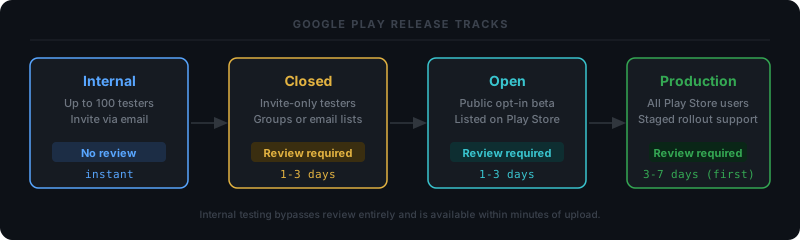
Google Play organizes releases into four tracks, each with different access controls and review requirements. Getting this wrong is a common source of confusion for first-time publishers.
| Track | Access | Review required | Notes |
|---|---|---|---|
| Internal testing | Up to 100 invited testers | No | Available within minutes of upload |
| Closed testing | Invited testers via email or group | Yes | Good for structured beta programs |
| Open testing | Anyone who opts in | Yes | Public beta on the Play Store |
| Production | All users | Yes | Your live listing |
Internal testing is the fastest feedback loop: upload, share a link, done. No waiting. Closed and open testing both require a full Google review, identical to production review. The label “testing” does not reduce scrutiny. Open testing is particularly useful for games because real users discover your beta build through the Play Store listing and opt in, giving you organic feedback before a full launch.
App Bundles, Releases, and Version Management
Google now requires Android App Bundles (AAB) for all new apps submitted to Google Play. APKs still work for sideloading and for apps that were already using them, but new app submissions must use AAB. The advantage is real: Google builds optimized APKs per device configuration from your bundle, reducing average download size by 15 to 20 percent, which improves install conversion.
Every release needs two version fields:
- Version code: an integer that must increase monotonically. Google uses this to determine which build is newer.
- Version name: a human-readable string like
1.2.0. Shown to users, ignored by Google for ordering purposes.
To create a release: navigate to your app in Play Console, select a track, click Create new release, upload your AAB, fill in release notes for each language you support, then click Review release. Release notes appear directly on the Play Store update screen. They are optional but worth writing, especially for major updates, since they are the only direct communication channel with your users at update time.
Countries, Regions, and the Google Review Process
By default, Google distributes your app in all countries where Play operates. You can narrow this in Store presence > Countries and regions: exclude specific countries, or flip to an allowlist and only target the markets you want. For Road Rage Runner we kept the default open distribution, but apps with payment requirements, age restrictions, or regulatory considerations often need a more controlled list.
The review process runs every time you submit a build to any track except internal testing. For a first submission to production, budget 3 to 7 days for review. Updates to existing apps typically clear in 1 to 3 days. Google offers an expedited review option for critical bug fixes, but it requires filing a support ticket and is not guaranteed.
Common reasons for rejection: missing privacy policy URL, incomplete store listing (screenshots missing for required device form factors such as tablets), or content that does not match the declared content rating. Before submitting, run through the App content section in Play Console. It surfaces most policy violations before Google ever sees the build.
Post-Launch Monitoring and Promoting Through Tracks
After launch, Play Console surfaces two primary monitoring views. Android Vitals tracks crash rate and ANR (Application Not Responding) rate broken down by device model, OS version, and app version. If either metric crosses Google’s bad behavior threshold, it can suppress your app’s discoverability in search results. Check it daily for the first two weeks. Ratings and reviews is the second surface: read the one-star reviews first, since they tend to surface real crashes and usability bugs faster than automated reports.
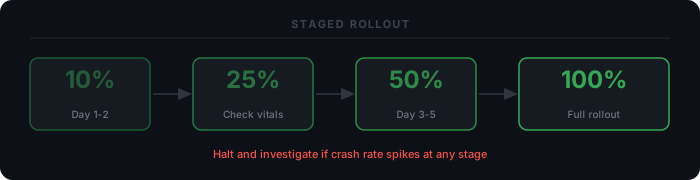
For production releases, use staged rollouts. Start at 10 to 20 percent. Monitor Android Vitals for 24 to 48 hours. If crash rate holds steady, increase to 50 percent, then to 100 percent. Play Console lets you halt a rollout instantly if metrics deteriorate: the update stops reaching new devices while users already on the update are unaffected.
When a build on a lower track is ready for production, use the Promote release button to move it to the next track without re-uploading. The binary that Google reviewed on your open testing track is the exact binary that goes to production: no re-signing, no re-uploading, no new review for the same build.
Road Rage Runner: Highway Moto is live on Google Play. The process above is exactly what it took to get it there.
Enjoy Reading This Article?
Here are some more articles you might like to read next: