Knockpy and crt.sh: Finding Subdomains Your Org Forgot
Most engineering orgs cannot list every subdomain they own. Knockpy and crt.sh close that gap in an afternoon, and explain why leaked dev environments and forgotten staging hosts stay a standing risk.
What Knockpy Does, and the Legal Line
Knockpy, maintained at guelfoweb/knockpy, is a Python tool that enumerates subdomains for a given domain. Version 9 ships with two complementary scan modes, a wildcard detector, and a local database that stores every run. Install is straightforward:
git clone https://github.com/guelfoweb/knockpy.git
cd knockpy
python3 -m venv .venv && . .venv/bin/activate
pip install .
Before any commands, a disclaimer.
Use this only on domains you own or have written authorization to test. Subdomain enumeration hits third-party services and in active mode sends DNS traffic at the target. Running it against infrastructure you do not own can violate computer misuse laws in most jurisdictions. This post is educational.
Three Modes: Recon, Bruteforce, Wildcard
Three commands cover most real workflows.
Passive recon. No packets touch the target. Knockpy queries public data sources and prints the resulting subdomains.
knockpy -d example.com --recon
Bruteforce. An active scan that resolves a wordlist of common subdomain names against the target’s DNS servers. A default wordlist ships with knockpy, and you can override it with --wordlist.
knockpy -d example.com --bruteforce
Combined recon plus bruteforce is the typical day-to-day run. Passive sources find the obvious hosts, bruteforce finds the unglamorous ones like jenkins, grafana, and staging-old.
knockpy -d example.com --recon --bruteforce
Wildcard detection. Some domains resolve every possible subdomain to the same IP, which makes bruteforce results useless. The --wildcard flag tests this and exits.
knockpy -d example.com --wildcard
You can tune concurrency, DNS resolver, and timeout at runtime:
knockpy -d example.com --bruteforce --wordlist ./custom.txt --threads 100 --dns 1.1.1.1
Inside Knockpy: Passive vs Active Scans
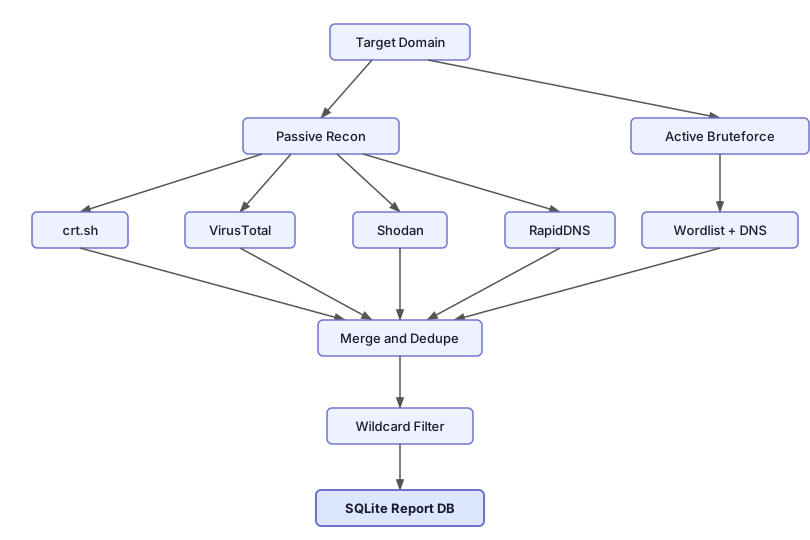
The passive path never touches the target. Knockpy queries third-party services that already index slices of the public internet. Each source catches different hosts, which is why a real recon run pulls from all of them at once.
crt.sh (Certificate Transparency logs). CT is a cross-vendor, append-only log where every certificate issued by a publicly trusted CA (Let’s Encrypt, DigiCert, Sectigo, Google Trust Services) is recorded. Every hostname in a certificate’s Subject Alternative Names field lands here within minutes of issuance, and modern browsers refuse certs that skip CT logging, so the coverage is close to complete for HTTPS. No API key. This is the strongest signal for production-facing web hosts.
VirusTotal. Maintains one of the largest passive DNS datasets in the industry, built up over years from the URLs, emails, and files users submit for scanning. When someone uploaded an attachment that referenced jenkins-old.company.com, that hostname got recorded, even if the host never had a public certificate. Free API key required, set via API_KEY_VIRUSTOTAL, with a 4 requests/minute cap on the public tier.
Shodan. Scans the entire IPv4 space continuously and fingerprints every reachable service: banners, TLS certs, protocol responses. Knockpy asks Shodan which hostnames it has observed on the target. Catches hosts answering on non-web ports (SSH, IMAP, RDP, custom TCP services) that a cert-only search will miss. Needs API_KEY_SHODAN.
RapidDNS. A free passive DNS aggregator, no API key, queried by scraping its result pages. Useful as a zero-setup fallback, and it occasionally surfaces subdomains the other sources miss because its collection pipeline is different.
Sources are pluggable. Configuration lives in ~/.knockpy/recon_services.json, and adding a new source is writing a small parser. To preview which sources are responding before a real run, knockpy -d example.com --recon --test exercises each one and prints the status.
The active path is a parallel DNS bruteforce. Knockpy spawns up to --threads (default 250) concurrent resolvers and queries every entry in the wordlist against the target’s authoritative nameservers, using --timeout (default 3 seconds) per lookup. Subdomains that resolve are kept, the rest are dropped.
The wildcard check runs before bruteforce. Knockpy generates random strings that almost certainly do not exist as subdomains and tries to resolve them. If they come back with an IP, the domain uses wildcard DNS and the bruteforce output needs to be filtered or treated carefully.
Reports, Replay, and HTML Export
Every knockpy run is persisted in a SQLite database under ~/.knockpy/. You list, replay, and export past runs through the --report flag.
knockpy --report list        # every past run
knockpy --report latest      # last run, printed
knockpy --report <ID>        # specific run
HTML export is supported through the same --report flag (check knockpy --help for the exact subcommand on your version). An HTML report is the artifact you attach to a ticket, share with stakeholders who do not live in a terminal, or drop into an audit trail. The more valuable trick is diffing reports week over week: newly appearing subdomains are where shadow IT shows up first.
crt.sh and the Attack Surface Inventory Problem
A good reconnaissance run often starts with crt.sh before touching knockpy at all. Certificate Transparency is a browser-enforced log where every publicly trusted TLS certificate is recorded. When a team in your org spins up new-staging.internal.company.com and fetches a Let’s Encrypt certificate, that hostname becomes searchable in crt.sh within hours. Anyone can query it with no credentials, and the results give you a solid starting list to feed into knockpy:
https://crt.sh/?q=%25.company.com
You cannot defend what you cannot see. Subdomain discovery is the cheapest first step, and it is one of the few security exercises where the tooling is free and the value compounds every week.
Enjoy Reading This Article?
Here are some more articles you might like to read next: