Claude Code Token Limit: How to Stretch Your Daily Budget
Every Claude Code Pro session starts with a quiet tax: CLAUDE.md loads, MCP servers initialize, skills register. Before you type a single message, roughly 10,000 tokens are gone. Plan a feature, revise the spec, iterate on the approach. You’re already at 40% of your 5-hour budget. Start implementing, debug what broke, verify it works, and the limit hits. You wait. The momentum is gone.
Why Claude Code Token Limits Break Your Flow
The token ceiling is not just a billing constraint. It is a pacing problem. Sessions have a natural shape: orient, plan, build, verify. That arc fits inside a 5-hour window only if token spend is efficient. Most sessions are not efficient, not because of waste in the obvious sense, but because of structure. Every git status dumps verbose output into the context. Every explanation Claude gives is written for a patient reader rather than someone who already knows the domain. Every file that was read once stays in context whether it matters anymore or not. The result is a session that burns through budget on overhead instead of work.
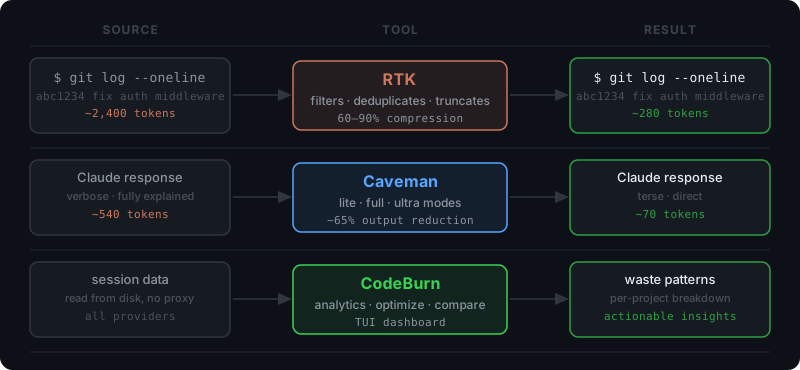
Three tools attack this from different angles. RTK compresses what goes into context. Caveman trims what comes out of the model. CodeBurn shows where the remainder goes so you know what to fix next. None of them require changes to how you work. Install them once and they run in the background.
RTK: Compress What Goes Into Context
Command output is one of the largest and most overlooked sources of token consumption in a Claude Code session. A git log with a hundred entries, a docker ps with a dozen containers, an npm install with its full dependency tree: all of it lands in context verbatim unless something intercepts it first. RTK is that interceptor.
RTK is a single Rust binary that acts as a proxy for common shell commands. It supports 100+ commands across git, npm, cargo, docker, and other ecosystems. The interception is transparent: a hook rewrites git status to rtk git status automatically, so nothing in your workflow changes. What changes is the output: filtered, grouped, deduplicated, and truncated to what Claude actually needs to make a decision.
The numbers are concrete. In a typical 30-minute coding session, RTK reduced token consumption from approximately 118,000 tokens to 23,900, an 80% reduction on command output alone. Across a full development session, Claude Code best practices point to bash output as a primary driver of context bloat. RTK addresses that directly.
Install:
# Homebrew
brew install rtk-ai/tap/rtk

# Or curl
curl -sSL https://raw.githubusercontent.com/rtk-ai/rtk/main/install.sh | bash
After installation, add the hook to your Claude Code configuration or run rtk gain to verify savings from your sessions.
Caveman: Make Claude Stop Over-Explaining
RTK handles the input side. Caveman handles the output side. By default, Claude writes responses for a general audience: full sentences, examples, context, summaries. For a developer in the middle of a session who already knows the codebase and just asked a specific question, most of that text is noise. Caveman replaces it with signal.
The plugin enforces brevity at the model level. Activate it with /caveman and responses shift to terse fragments. Enough information, stripped of everything else. A React re-render explanation that normally takes 540 tokens comes back in 70. An auth middleware fix that would fill a screen arrives in two lines. Across a benchmark of 10 typical development tasks, Caveman delivered an average of 65% output token reduction with no loss in technical accuracy.
Three intensity levels let you match verbosity to context. Lite mode keeps grammar intact and reads as professional terseness. Full mode uses fragments and drops articles. Ultra mode compresses to telegraphic abbreviations, useful for repetitive operations like reviewing a long list of small changes. A /caveman-compress command also runs on your CLAUDE.md and memory files, shrinking input context by roughly 46%.
Install:
claude plugin marketplace add JuliusBrussee/caveman && claude plugin install caveman@caveman
Activate with /caveman, deactivate with “normal mode”. Toggle modes with /caveman lite, /caveman full, or /caveman ultra.
CodeBurn: See Where Your Tokens Actually Go
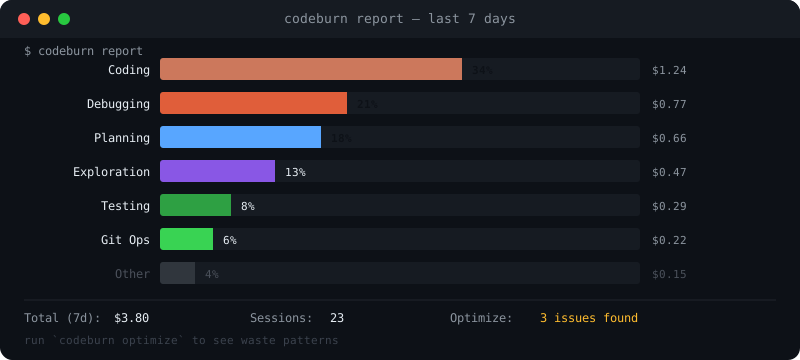
RTK and Caveman reduce consumption. CodeBurn tells you what is left and where it is going. It reads session data directly from disk, no proxy, no API key, no instrumentation required, and renders a terminal dashboard with spending broken down by project, model, task category, tool, shell command, and MCP server.
The most useful feature is codeburn optimize. It scans your recent sessions and flags specific waste patterns: files that were read multiple times without being edited, bash commands with uncapped output, MCP servers that were loaded but never called, context files that have grown beyond useful size. These are not general recommendations. They are findings from your actual sessions. One review of a typical week’s usage will surface at least two or three concrete changes that cut measurable budget.
The model comparison tool is worth running before committing to a model for a long project. It puts two models side by side across one-shot success rate, retry frequency, cost per call, cache hit rate, and per-category performance. Session limits feel different when you know that one model resolves a debugging task in one attempt while another averages three.
Install:
npm install -g codeburn
# or run without installing
npx codeburn
Key commands: codeburn report for a 7-day dashboard, codeburn today for current spend, codeburn optimize for waste patterns, codeburn compare for model analysis.
Two Habits That Cost Nothing
Tools compress and filter, but two simple habits do more to prevent token drain than any proxy. First, do not rely on autocompact. Claude Code compacts the context automatically when it approaches the limit, but by then the context is already bloated and the compression summary loses fidelity. Compact manually at 50 or 60% with /compact instead. The summary captures the session while it is still sharp, and you get a clean working context without hitting the wall. Second, start each new feature in a fresh context window. The context from the previous session contains file reads, diffs, tool call outputs, and back-and-forth that are irrelevant to the new task. Continuing an old session in the wrong direction costs far more than the ~10,000 token overhead of starting fresh. One feature per context window is a discipline that compounds across every session.
None of these solve the token limit. They change what the limit means. RTK cuts bash output, Caveman cuts response verbosity, CodeBurn surfaces what is left to fix, and two free habits keep the context clean throughout. The same 5-hour budget covers substantially more work, and the limit stops being the thing that ends your sessions.
Enjoy Reading This Article?
Here are some more articles you might like to read next: