Capacitor WebView Cache: Why New Builds Show Old Assets
A Capacitor WebView cache bug in our runner game kept shipping old JavaScript to players after every update, even though the new APK installed cleanly. Two stacked cache layers had to be torn out before a fresh build actually reached the screen.
How Capacitor Wraps a Web Game in a Native Shell
Capacitor is Ionic’s successor to Cordova: a thin native runtime that hosts your HTML, CSS, and JavaScript inside a platform WebView and exposes native APIs through a JavaScript bridge. On Android, your www/ folder is bundled straight into the APK and served by the system WebView, which is Chromium on any modern device. On iOS, the same bundle runs inside WKWebView. One codebase, two native shells, and near-native input latency for a canvas-based game like ours, a mobile runner called Road Rage that my friend started building and I joined a few weeks in.
The architecture looks like this:
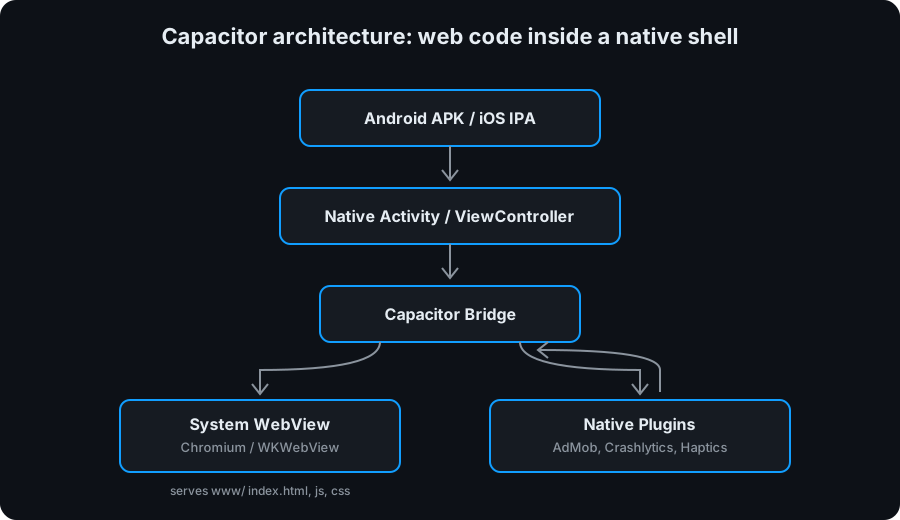
The WebView is the whole runtime. Everything the player sees is HTML rendered inside that container, and every native capability reaches the game through the bridge. Which is exactly why the WebView’s caching behavior became load-bearing for us.
The Bug: New Build Installs, Old Game Loads
We ship internal builds through Firebase App Distribution. The flow is normal: bump the version, run npx cap sync, assemble the APK, upload, testers tap Update. The APK installs fine, the version label on the main menu shows the new number, then the game boots into a visibly older UI. The worst symptom was mixed-version state: a new index.html loading against stale game.js and styles.css from the previous install. On a Pixel 5 this silently broke the ×2 coins button because the event handler it needed lived in the new JS bundle, but the markup was rendering against the old one.
“Clear app storage” fixed it every time, which was the giveaway. The bytes inside the APK were correct. Something between the APK and the screen was holding onto the previous build’s files.
Two Cache Layers Between Your Code and the Player
A Capacitor Android app can cache assets in two independent places, and both have to be right for an update to stick:
- Service Worker cache. A legacy PWA service worker (
sw.js) from the early web prototype was still registered, using a cache-first strategy keyed on a hardcoded cache name. Because the cache name never changed, every boot readindex.htmland friends from IndexedDB instead of from the APK. New builds were invisible to the app until someone wiped storage. - Android WebView HTTP cache. Even after removing the service worker, Android’s system WebView keeps its own disk-backed HTTP cache for files it has loaded before. That cache is not flushed when the APK is upgraded, so assets that matched the previous install’s URLs kept serving from WebView storage in preference to the fresh copies packaged inside the new APK.
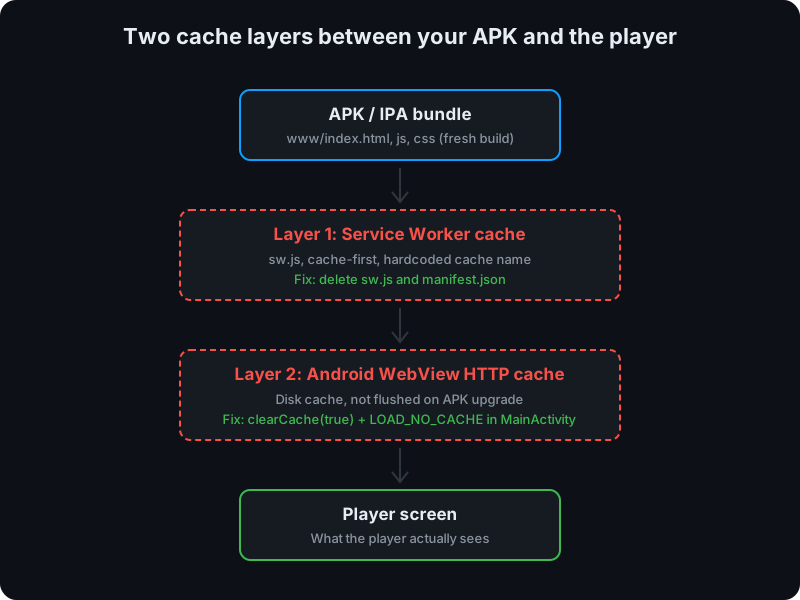
The two layers produce the same external symptom, which is why the first fix looked complete and wasn’t. You end up debugging the wrong layer twice.
The Fix: Remove One Cache, Disable the Other
The first commit ripped out the service worker and the PWA manifest entirely. Capacitor already serves www/ directly from packaged assets, so a service worker sitting on top of that was redundant and strictly harmful. Six files deleted, one cache layer gone, problem apparently solved. It wasn’t.
The second commit reached into MainActivity.java and did two things on every startup:
WebView webView = this.bridge.getWebView();
if (webView != null) {
    webView.clearCache(true);
    webView.getSettings().setCacheMode(WebSettings.LOAD_NO_CACHE);
}
clearCache(true) flushes any HTTP cache left over from the previous install, and LOAD_NO_CACHE tells the WebView to skip its disk cache on subsequent loads. There is no performance penalty, because Capacitor reads www/ straight from the APK’s packaged assets, not over HTTP. The moment this landed, Firebase App Distribution updates started reaching players cleanly and the ×2 coins button came back to life.
Cross-platform hybrid stacks like Capacitor and Cordova are built on a compromise: one web codebase, two native hosts. That compromise is mostly invisible, until a caching layer you forgot about starts serving yesterday’s build. The rule we now enforce in this codebase is simple: on a native host, the WebView must never cache code it reads from packaged assets.
Enjoy Reading This Article?
Here are some more articles you might like to read next: